
Restarting the Android app automatically
Android devices occasionally install a system update in the background. When that happens, Android sometimes closes apps that aren’t actively in use at that moment, including the 20Tabs app. The device is then left on the home screen until someone reopens the app by hand.
One setting prevents this. You give the 20Tabs app permission to bring itself to the foreground, so it reopens automatically after a moment like that. You only need to turn this on once per device.
This applies to Android devices only. On an iPad or iPhone the setting isn’t needed.
Turning on the setting
- Open Settings on the device.
- Go to Apps and find the 20Tabs app in the list.
- Open the app and choose Display over other apps. On some devices you’ll find this under Advanced, or via Settings → Apps → Special app access → Display over other apps.
- Switch it on, or choose Allow.
- Reopen the 20Tabs app.
Checking that it works
When automatic restart is active, a 20Tabs notification appears. Swipe down from the top to open your notifications.
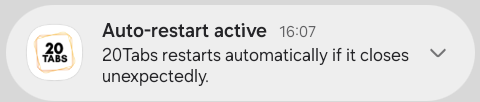
See this notification? Then 20Tabs will restart automatically if the app closes unexpectedly. If you don’t see it, check that you completed step 3 and reopen the app.
Good to know
The exact menu names can differ slightly from one device to another. If so, search the settings for Display over other apps.
Have a lot of devices, or would you rather set this up together with us? Get in touch via our contact page, and we’ll help you get going.